In this article
A catalog is a master list of options that fill the dropdowns (combo boxes) of the whole application: species, breeds, sizes, visit reasons, medications, vaccines, administration routes, appointment types and much more.
Instead of many separate forms, PetSoph offers one single manager for all catalogs.
How to get there
- Sign in to PetSoph.
- Side menu Administración → Catálogos.
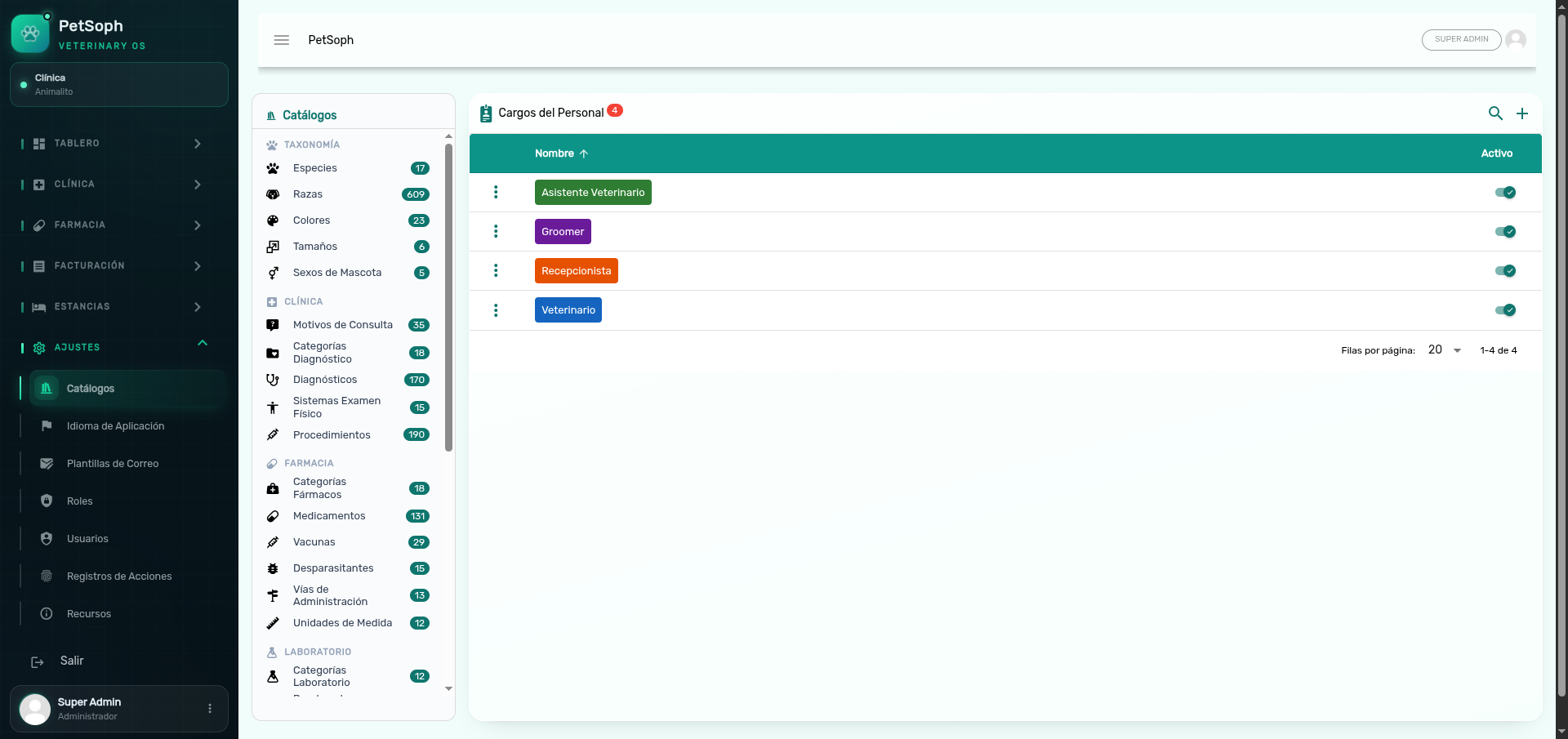 Figure 1. Master catalog explorer and editor grouped by functional area.
How the screen is organized
| Area | Content |
|---|---|
| Left column | Catalog list grouped by area, with the record count of each one |
| Right column | Table of the selected catalog: search, create, edit and enable/disable |
The groups are: Taxonomía, Clínica, Farmacia, Laboratorio, Personal, Citas, Estancia and Caja.
Catalogs by group
| Group | Catalogs |
|---|---|
| Taxonomía | Especies, Razas, Colores, Tamaños, Sexos de Mascota |
| Clínica | Motivos de Consulta, Categorías Diagnóstico, Diagnósticos, Sistemas Examen Físico, Procedimientos |
| Farmacia | Categorías Fármacos, Medicamentos, Vacunas, Desparasitantes, Vías de Administración, Unidades de Medida |
| Laboratorio | Categorías Laboratorio, Pruebas de Laboratorio, Perfiles de Laboratorio |
| Personal | Cargos del Personal |
| Citas | Tipos de Cita, Estados de Cita |
| Estancia | Opciones de Apetito, Ánimo, Actividad y Baño/Sanitario, Tipos de Servicio, Checklist de Estancia |
| Caja | Categorías de Egresos |
Create and edit a record
- Select the catalog on the left column.
- Press + to create, or the edit icon (pencil) on a row.
- Fill in the form and save.
The form fields depend on the catalog:
| Field type | Example |
|---|---|
| Text | Species name, vaccine brand |
| Number | Suggested price, estimated duration, first dose (weeks) |
| Text area | Description |
| Toggle | Is the medication controlled? |
| Color | Background or text color (statuses, positions) |
| Dependent list | Breeds pick their Especie; Diagnoses pick their Categoría; Medications pick their Categoría |
In parent-child catalogs, the column shows the parent’s name on a colored chip. The count next to the name shows how many records depend on that row (for example, how many breeds a species has).
Active and system records
| Column | What it controls |
|---|---|
| Activo | Toggle that includes or excludes the option from the application lists |
| Sistema (hidden) | Marks protected records; they cannot be deleted |
If you try to delete a system record, the system blocks it with a notice. These records are essential for PetSoph to work.
Spreading the changes
Catalog changes spread in real time to the connected workstations: the application lists and dropdowns update without restarting anything.
Next
- System languages: the interface translations.