In this article
The clinical record is the pet’s single file in PetSoph. Instead of loose papers or cards that get lost, everything that happens to the pet —consultations, vaccinations, surgeries, grooming, vital signs and photos— accumulates by date in the same place.
Getting there
- Menu Clinical → Clinical Record, find the pet by name or by owner’s name.
1. The header of the record
- Pet in the photo, species badge.
- Main owner and phone (for billing and contact).
- Badges: sex, breed, color and age (calculated automatically).
- Last visit with date and time.
- Button Check-out / Visit settlement (top right): settles the whole visit.
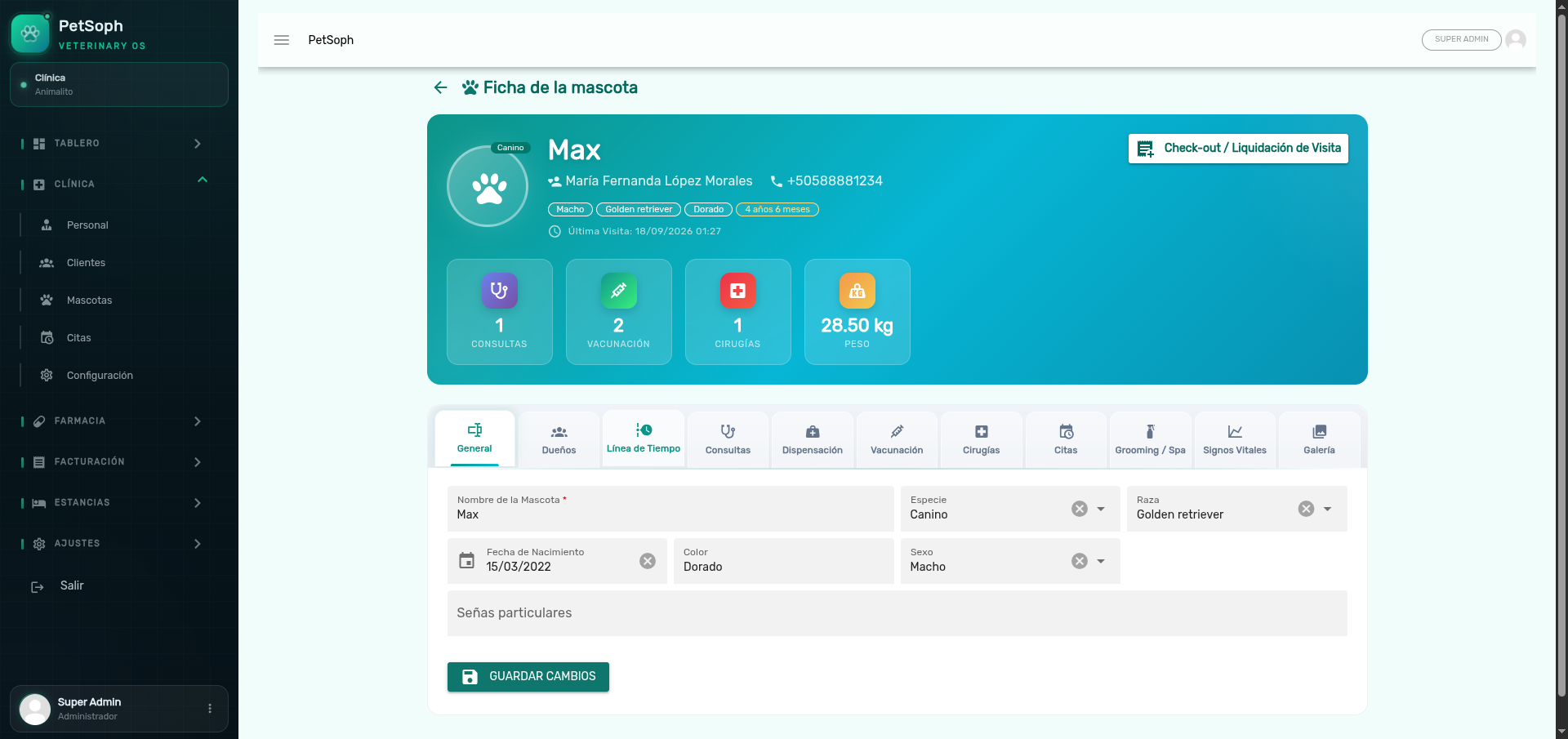 Figure 1. Clinical record header with pet information, owner details, and summary KPIs.
2. Summary cards (KPIs)
Four cards summarize the pet’s activity:
| Card | Shows |
|---|---|
| Consultations | Total consultations registered |
| Vaccinations | Total doses in the card |
| Surgeries | Surgical procedures performed |
| Current weight | Latest weight with its date |
The Weight card only appears when the pet has at least one vital sign record with weight. It is the gate to monitor condition and body score.
3. Tabs of the record
| Tab | Contains |
|---|---|
| General | Identity: species, breed, color, birth date, marks |
| Owners | Pet owners; one is always the main owner (star) |
| Timeline | Unified chronological history of all clinical acts |
| Consultations | Medical visits with their prescriptions |
| Dispensing | Prescription hand-overs, linked to medicines |
| Vaccinations | The vaccination card |
| Surgeries | Surgical procedures |
| Appointments | The pet’s appointments |
| Grooming | Esthetic services with status and billing |
| Vitals | Weight, temperature, heart and respiratory rate |
| Photos | Clinical photos, up to 3 per upload |
General
Basic identification data. Age is calculated automatically from the birth date.
Owners
There can be several owners of one pet. One of them is always the main owner: the one who is billed in the invoices. If the pet is left without a main owner, billing is blocked.
A pet cannot remain without at least one owner; the system blocks removing the last one. For billing, there must be a main owner; without one, charging is blocked.
Timeline
Consultations, vaccines, surgeries, grooming and vitals appear in a single chronological list. Each event has its icon and color:
| Event | Icon / color |
|---|---|
| Consultation | blue Stethoscope |
| Vaccination | green Needle |
| Surgery | red Hospital |
| Grooming | purple Spray bottle |
| Vitals | orange Heart pulse |
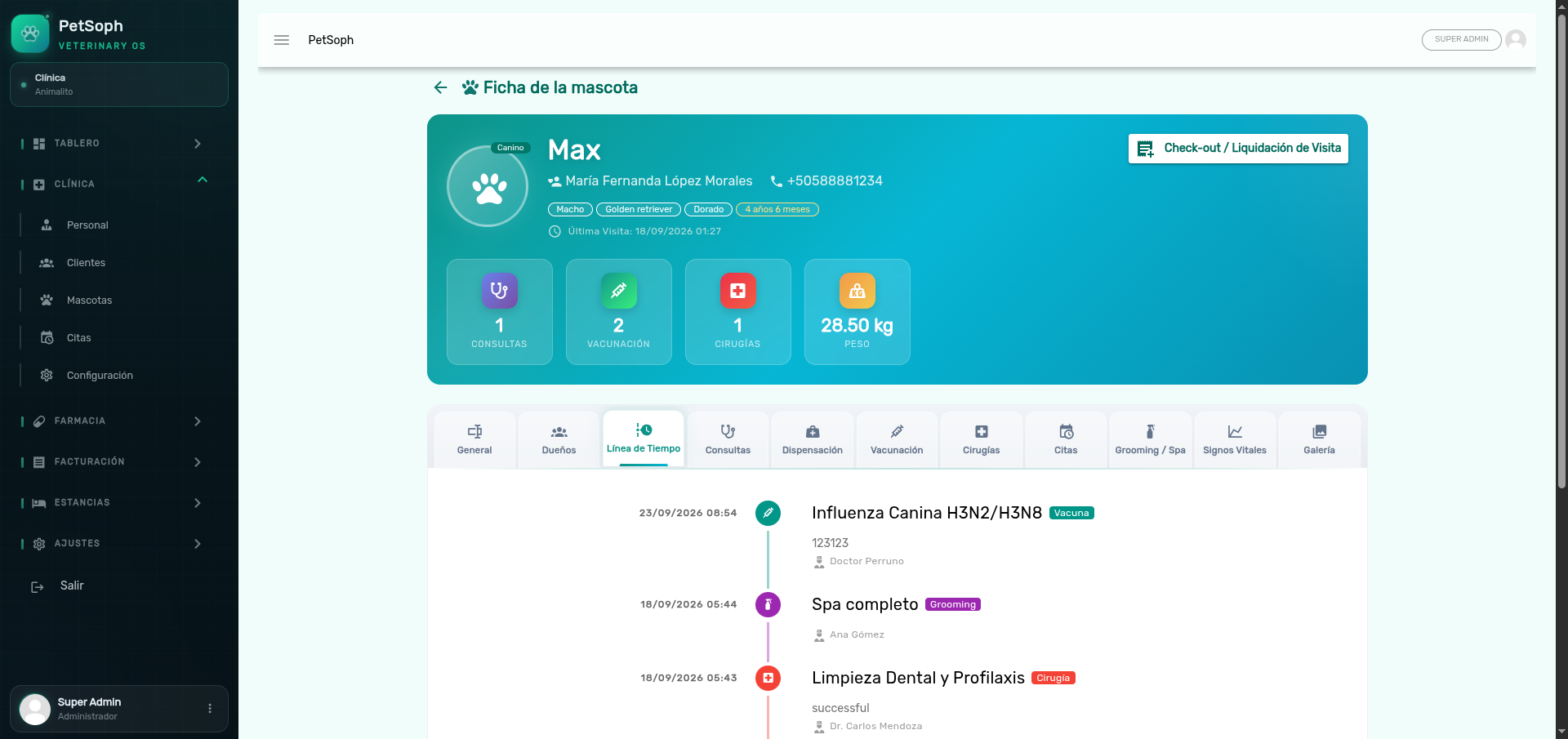 Figure 2. Unified chronological timeline with history of consultations, vaccines, surgeries, and grooming.
Photos
Clinical pictures: injuries, treatment progress, skin condition… Up to 3 photos per upload (10 MB max each, images only), each with an optional caption. Use Add to upload and the trash icon to delete (with confirmation).
Photographs are the best evidence of progress. Always take an initial picture and one at the end of the treatment: the timeline shows both side by side.
What’s next
- Medical consultation and prescription: how to fill in a visit and its recipes.
- Vaccination: the vaccination card by species.
- Vital signs: weight, temperature, heart and respiratory rate.
- Surgeries: the surgical record.
- Grooming: esthetic service with status and billing.
- Consolidated check-out: settle the whole visit in a single invoice.