In this article
Every PetSoph invoice follows clearly defined statuses. Knowing them allows you to track billing progression at a glance via the color badge in the invoices table.
1. Statuses
| Status | Badge | Meaning |
|---|---|---|
Pending (PENDING) |
Amber | Invoice created, unpaid |
Partially Paid (PARTIALLY_PAID) |
Blue | Down payment / deposit made, remaining balance |
Paid (PAID) |
Green | Fully paid |
Void (VOID) |
Red | Voided from Cash Register |
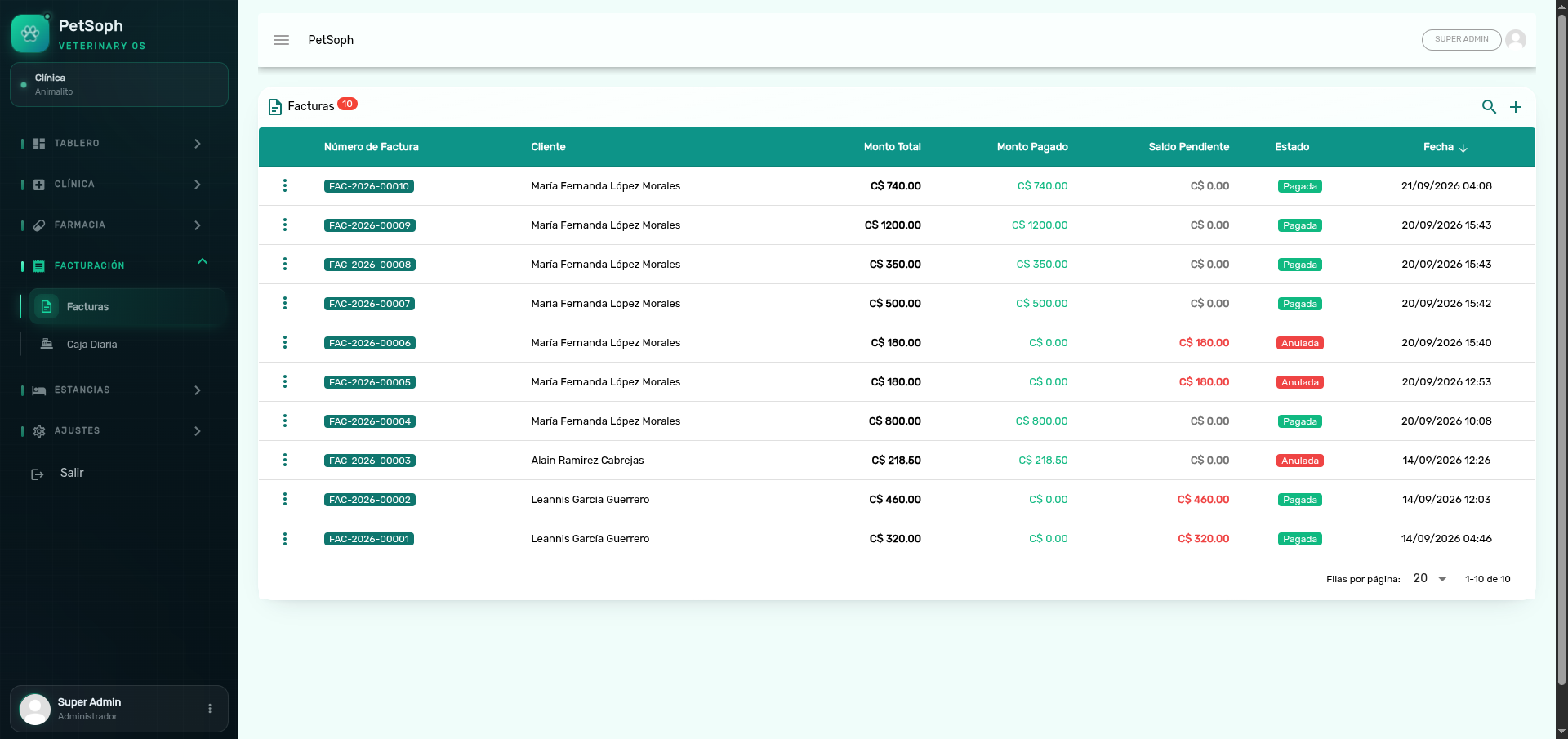 Figure 1. List of issued invoices with customer, amounts, balance, and status.
2. Invoice lines: Independent Products and Services
When creating or editing an invoice, each line features an item type toggle:
- Product (box icon): physical inventory items from pharmacy (medications, pet food, supplies).
- Service (medical bag icon): clinical care and aesthetic acts from the Clinic Services Catalog (consultations, vaccines, surgeries, grooming, boarding).
Each line automatically calculates its total and tax rate (VAT or Exempt) based on the item settings.
3. Clinical act to invoice
- A clinical act (consultation, vaccination, surgery, grooming) is invoiced only once.
- The invoice is generated as Pending (
PENDING) awaiting payment. - Upon payment (partial or full), it updates to Partially Paid (
PARTIALLY_PAID) or Paid (PAID).
4. Payment and deposits
Every payment records a cash movement tied to the active cash register shift:
| Action | Invoice outcome |
|---|---|
| Full payment | Moves to Paid |
| Partial deposit | Moves to Partially Paid |
| Remaining balance payment | Moves to Paid |
5. Voiding an invoice
Invoices are never deleted; they are voided through the Cash Register with a mandatory reason.
Invoiced clinical acts cannot be removed from the patient record. To correct a charge, void the invoice in Cash Register first; the clinical act will then become available for re-invoicing.
What’s next?
- Clinic services: managing services and rates.
- Cash register shifts: opening and closing cash register shifts.
- Voiding invoices: step-by-step refund flow.