In this article
Voiding is the correct way to undo a charge in PetSoph. An already-collected invoice is never deleted — money already entered the cash shift. Instead it is voided from the Cash Register, which refunds the payment to the owner and leaves a full trace (consumed number, reason, who voided it, timestamp).
Only Cash Register with the amount already collected can void. A pending invoice is simply left uncollected; voiding is for money already in the shift.
Step by step
- Facturación & Caja → Caja Registradora → the invoice → Void.
- Confirm the reason (mandatory — stays in the receipt and the audit log).
- Confirm: the invoice goes to Voided, the refund movement is registered and the owner receives the money back.
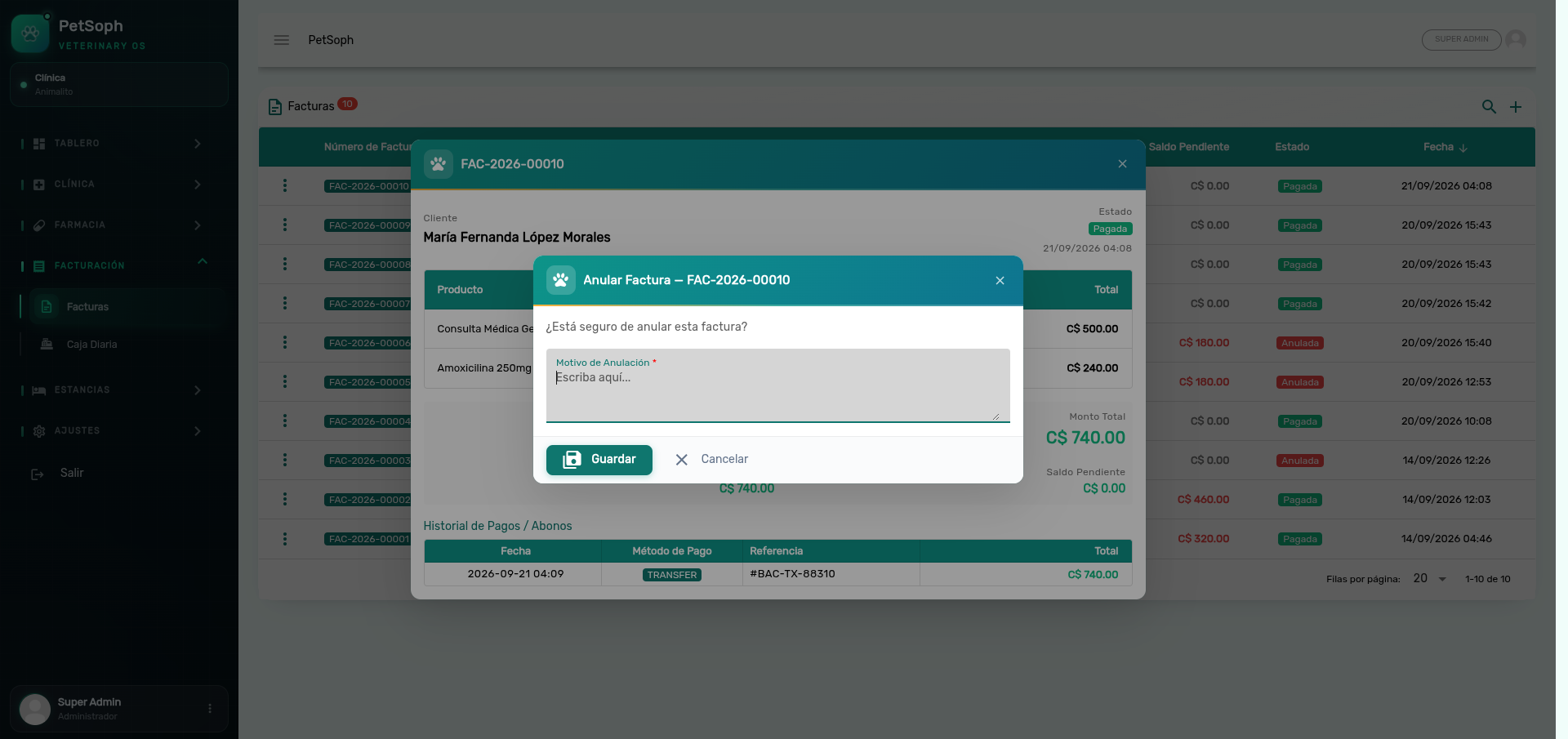 Figure 1. Invoice voiding dialog with required cancellation reason.
What happens to the clinical act
| Act | After voiding |
|---|---|
| Consultation | Returns to ready to bill |
| Vaccination | Returns to ready to bill |
| Surgery | Returns to ready to bill |
| Grooming | Returns to ready to bill |
| Stay | Returns to ready to bill |
That’s the recovery path: to correct an amount you void the invoice and charge again with the right figure — the voided invoice stays as history with its number consumed.
The invoice number is never reused: FAC-{year}-{5 digits} consecutive keeps advancing. A
voided invoice shows Voided in red, never disappears from the list.